> ## Documentation Index
> Fetch the complete documentation index at: https://rive-unity-feature-databinding-fonts-globals.mintlify.site/llms.txt
> Use this file to discover all available pages before exploring further.
# Sharing & Embedding
> Share your Rive files with a hosted link or embed them in websites and other platforms.
Generating embed URLs is available on Voyager and Enterprise plans. [Learn more about our plans and pricing](https://rive.app/pricing?utm_source=docs\&utm_medium=content).
Embed URLs let you quickly generate a shareable version of your file for embedding or sharing.
An embed URL is a **snapshot** of your file at the moment it’s generated. If you make changes later, you’ll need to generate a new link to reflect those updates.
Embeds use iframes and don't provide access to Rive's runtime APIs. If you need to control or interact with your Rive programmatically, use a [Rive runtime](/runtimes/getting-started) instead.
## Creating an Embed URL
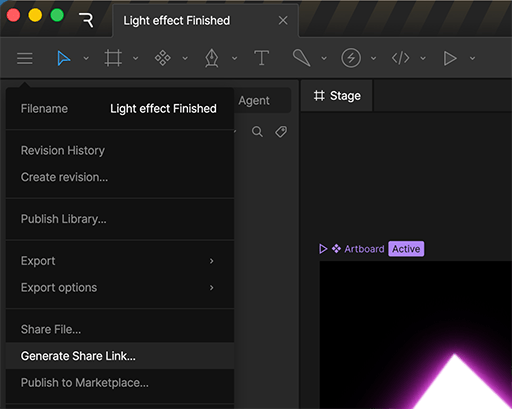
In the Rive editor, click the **main menu** in the top-left corner and select **Generate Embed URL**.
 In the dialog that appears, choose the artboard and state machine or timeline animation to display, and click **Generate Link**.
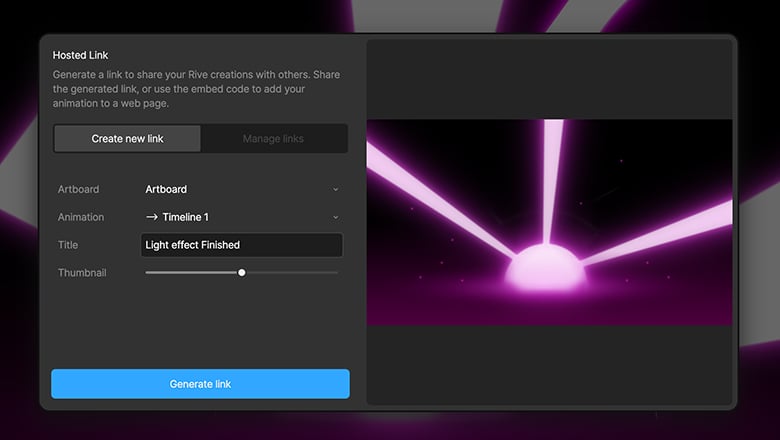 * **Enable** — Turn the link on or off to control access.
* **Rive Renderer** — Use the Rive Renderer (recommended) or Canvas renderer.
* **Multi-touch** — Enable support for multi-touch interactions.
Certain features, such as [Vector Feathering](https://rive.app/blog/introducing-vector-feathering?utm_source=docs\&utm_medium=content), are only available using the Rive Renderer. See our [Feature Support](/feature-support) page for more information.
* **Enable** — Turn the link on or off to control access.
* **Rive Renderer** — Use the Rive Renderer (recommended) or Canvas renderer.
* **Multi-touch** — Enable support for multi-touch interactions.
Certain features, such as [Vector Feathering](https://rive.app/blog/introducing-vector-feathering?utm_source=docs\&utm_medium=content), are only available using the Rive Renderer. See our [Feature Support](/feature-support) page for more information.
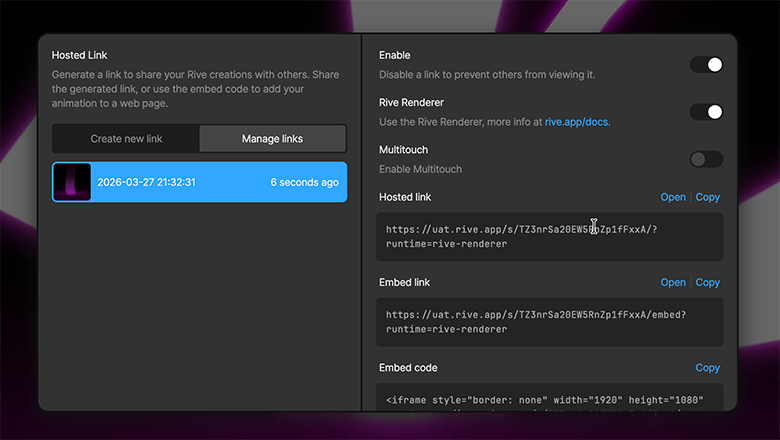 Select the option that best fits how you plan to use your file.
For more information on using embed URLs with tools like Framer, Webflow, and Notion, see [Integrations](/integrations/overview).
* **Hosted link** — Opens your file on a dedicated Rive page with a framed viewer. Ideal for sharing with clients or stakeholders.
* **Embed link** — Displays your file without the surrounding Rive UI. Useful for platforms that automatically preview links, such as Notion and Telegram.
* **Embed code** — An iframe snippet for embedding your file into sites where you can edit HTML, such as WordPress.
* **Framer code (Deprecated)** — See the new official [Rive Framer Plugin](https://www.framer.com/marketplace/plugins/rive/).
## Sharing on Social Media
Copy the **Hosted Link** and paste it into a supported social platform. The link includes metadata that allows supported platforms to display a preview of your Rive file.
## Managing Embed URLs
Visit the [Embed URLs](https://rive.app/account/links?utm_source=docs\&utm_medium=content) section of your settings to manage the links you've generated. You can disable an embed URL by turning off **Active**.
Select the option that best fits how you plan to use your file.
For more information on using embed URLs with tools like Framer, Webflow, and Notion, see [Integrations](/integrations/overview).
* **Hosted link** — Opens your file on a dedicated Rive page with a framed viewer. Ideal for sharing with clients or stakeholders.
* **Embed link** — Displays your file without the surrounding Rive UI. Useful for platforms that automatically preview links, such as Notion and Telegram.
* **Embed code** — An iframe snippet for embedding your file into sites where you can edit HTML, such as WordPress.
* **Framer code (Deprecated)** — See the new official [Rive Framer Plugin](https://www.framer.com/marketplace/plugins/rive/).
## Sharing on Social Media
Copy the **Hosted Link** and paste it into a supported social platform. The link includes metadata that allows supported platforms to display a preview of your Rive file.
## Managing Embed URLs
Visit the [Embed URLs](https://rive.app/account/links?utm_source=docs\&utm_medium=content) section of your settings to manage the links you've generated. You can disable an embed URL by turning off **Active**.